
Live Copy Paste (Cross-Site Copy Feature)
Divi Live Copy Paste is a powerful feature that allows you to copy and paste sections, rows, or modules from one Divi website to another instantly—without exporting or importing any files.
This helps you reuse designs, speed up your workflow, and maintain consistency across multiple websites.
What You Can Do
- Copy layouts from one website to another
- Transfer Sections, Rows, and Modules
- Preserve full design (styles, spacing, fonts, content)
- No need to export JSON files
How It Works
Step 1: Enable the Feature
- Go to Divi Essential Settings
- Enable the Live Copy Paste extension
- After Enable the extention a new tab will be added to the under the Advance Tab Called "Live Copy"
- Enable the section for copy paste. To do this go to section > Advance > Enable live copy
Step 2: Copy an Element
- Open the page where your desired section you designed.
- Hover over a Section, Row, or Module
- Click the Copy icon or press Ctrl + C (Cmd + C on Mac)
Step 3: Paste on Another Website
- Open the Divi Builder on another site
- Press Ctrl + V (Cmd + V on Mac)
- The element will instantly appear with full styling
Clipboard Permission (Important)
To use Live Copy Paste, your browser needs permission to access the clipboard.
What Happens?
When you enable the feature and open the Visual Builder, a popup will appear asking:
“See text and images copied to the clipboard”
What You Need to Do
- Click Allow
- Without this permission, the feature will not work
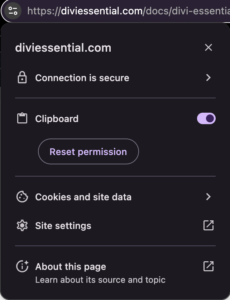
If You Click “Block”
- Click the 🔒 lock icon in the browser address bar
- Find Clipboard
- Set it to Allow
- Refresh the page
Permission Popup Example
Enable Clipboard from Site Settings
Important Notes
- Permission is required only once per site
- Handled securely by your browser
- No data is stored externally
Key Features
- Cross-site copy and paste
- Works with Sections, Rows, and Modules
- Keeps full styling and content intact
- No file export/import required
- Supports keyboard shortcuts
- Fast and seamless workflow
Requirements
- Divi Essential must be installed and activated on both websites
- Live Copy Paste must be enabled
- Both sites should be accessible in your browser
Tips
- Copy fully configured elements for best results
- Minor adjustments may be needed depending on theme differences
- Ensure both sites use compatible Divi versions
FAQ (Frequently Asked Questions)
Can I copy content between different domains?
Yes, as long as Divi Essential is active on both websites.
Do I need to export or import files?
No, everything works instantly without files.
Will design and styling be preserved?
Yes, all styles and layout settings are copied.
Does it work with all Divi elements?
It works with Sections, Rows, and Modules. Some third-party modules may vary.
What if paste doesn’t work?
- Ensure Clipboard permission is allowed
- Check if the feature is enabled on both sites
- Refresh the builder and try again
Can I use it on staging and live sites?
Yes, it works across both environments.
Is it secure?
Yes, everything works within your browser session.
Can I undo a paste?
Yes, use Ctrl + Z / Cmd + Z in Divi Builder.
Summary
Divi Live Copy Paste allows you to instantly reuse layouts across websites without any manual export/import process. Just copy, paste, and you're done.