
With the Divi Embedded timeline module, you can easily embed multiple Tweets on your website in a compact, linear view. Display the latest Tweets from a Twitter account.
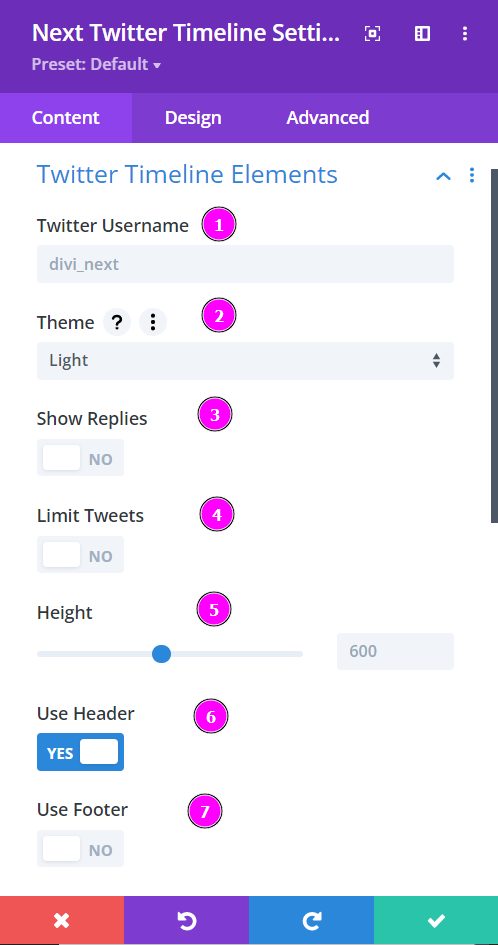
Content → Twitter Timeline Elements
- Twitter Username - Add the Twitter username
- Theme - pick a Theme between light and dark.
- Show Replies - enable to show replies
- Limit Tweets - limit the number of tweets
- Height - adjust and resize your Twitter Timeline design
- Use Header - choose to use header,
- Use Footer - enable to use the Footer for the Twitter timeline
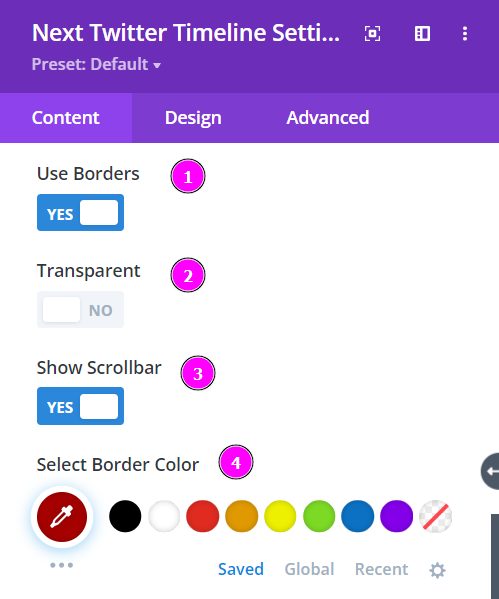
Content → Twitter Timeline Elements (continued)
- Use Borders - enable this to add borders to your design
- Transparent - enabling this switch will make the background transparent
- Show Scrollbar - enabling this will help show the scrollbar to go through the tweets
- Select Border Color - choose a beautiful color to match your Twitter Timepline design